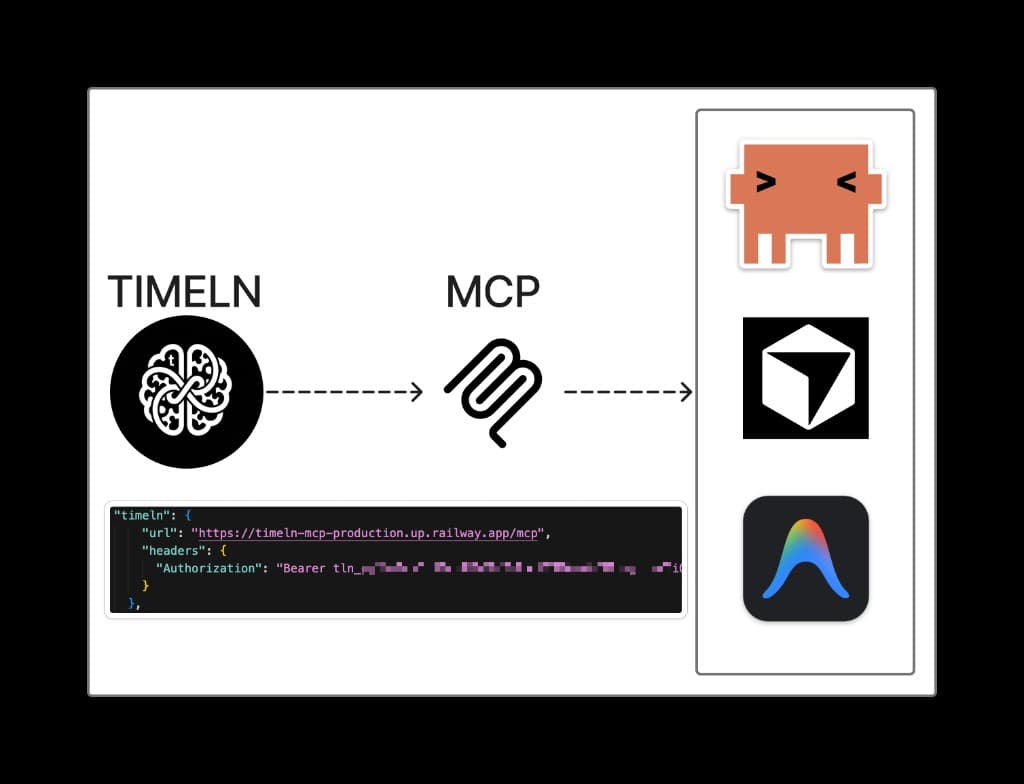
Introducing the Timeln MCP: your memory, on any AI
Your AI agents can finally read and write your Timeln. One URL, one token, eight tools—works in Claude Code, Cursor, other agentic IDEs, Claude Desktop, and anything that speaks Model Context Protocol.

Rahul Kumar
Founder, Timeln
Most AI agents are amnesiacs. They are brilliant at the problem in front of them and draw a blank on everything you have ever written, read, or saved. The MCP standard changes that: it gives agents a common language for calling the tools that store your knowledge. This is our first move into that layer.
Today we are shipping the Timeln MCP—a hosted Model Context Protocol server that connects any MCP-compatible agent to your Timeln knowledge base. No plugins, no adapters, no Python to run. Paste one JSON block into your editor and your agent gains memory.
The problem
You ingest links, papers, meeting notes, and Slack threads into Timeln. A week later you ask your agentic IDE to help you draft a strategy doc. The model does a great job—based on what it can guess from the last five messages. It has no idea about the three articles you saved on pricing last Tuesday, the customer interview you added Monday, or the competitive teardown from October. Your brain is not on its desk.
MCP changes that conversation. Instead of pasting context by hand, your agent can call query_knowledge("what do I already know about pricing?") and get a grounded answer from your own documents.
What you get
Eight tools, all bearer-authed to a token you control:
whoami— confirm the current token; return email and planquery_knowledge(question)— natural-language query over your graph and docsget_recent_docs(window)— last weekly or monthly savessearch_documents(limit, offset)— paginated list of your documentsget_document(id)— one document with previewget_topic_entities(topic)— entities and sources around a keywordingest_text(text, title?)— add new text to the graphingest_url(url, title?)— ingest a public URL
Install in 30 seconds
- Sign up free at timeln.app/signup.
- Open Settings → API keys → Create. Copy the
tln_...token. - Pick your client below.
Claude Code (CLI)
claude mcp add --transport http --scope user timeln \
  https://mcp.timeln.app/mcp \
  --header "Authorization: Bearer tln_YOUR_TOKEN"
Verify with claude mcp list — you should see timeln · ✓ Connected.
Claude Desktop (Mac / Windows)
Desktop only speaks stdio MCP, so wrap the remote endpoint with mcp-remote (requires Node.js 18+). Edit ~/Library/Application Support/Claude/claude_desktop_config.json on macOS (%APPDATA%\\Claude\\claude_desktop_config.json on Windows):
{
  "mcpServers": {
    "timeln": {
      "command": "npx",
      "args": [
        "-y",
        "mcp-remote",
        "https://mcp.timeln.app/mcp",
        "--header",
        "Authorization: Bearer tln_YOUR_TOKEN"
      ]
    }
  }
}
Fully quit Claude Desktop (Cmd+Q) and reopen. First launch takes 10–20 s while npx downloads mcp-remote.
claude.ai (web)
Open Settings → Connectors → Add custom connector. Name: Timeln. Remote MCP server URL: https://mcp.timeln.app/mcp. Authentication: Bearer token, paste your tln_.... Enable inside any chat from the Search & tools menu. Requires a Pro, Max, Team, or Enterprise plan.
Cursor and other MCP clients
Paste the JSON form into your agent's MCP config (e.g. ~/.cursor/mcp.json):
{
  "mcpServers": {
    "timeln": {
      "url": "https://mcp.timeln.app/mcp",
      "headers": {
        "Authorization": "Bearer tln_YOUR_TOKEN"
      }
    }
  }
}
Restart the agent. Type /timeln — you should see timeln connected.
What it feels like
> query_knowledge("what connects LangChain and my agent work?")

3 docs · 7 entities
→ Tool-calling patterns (Oct 12)
→ Agentic RAG deep-dive (Oct 19)
→ Your Beehiiv brief mentions both
Real titles. Real dates. No hallucination — because the MCP is a thin wrapper over the same API powering the Timeln dashboard.
What’s next
The MCP is the transport layer. The layer on top—reasoning, the PARA framework, and an interactive D3 knowledge-graph view—ships as the open-source Claude skill Timeln Second Brain. Use one, the other, or both.